

Revision on Knowness is designed to help you revisit knowledge over time rather than relying on one-off study sessions.
Once you complete a lesson, its flashcards and exercises become available for revision. Knowness then schedules them for future review, helping you strengthen knowledge and skills over time.
1. Completing Lessons Unlocks Revision
Revision is based on content from lessons you have completed. When you complete a lesson, its flashcards and exercises become available for ongoing revision.
This means your revision library grows as you progress through the course.
2. Revision Across Knowness
You can access revision in several places depending on what you want to review:
- Lesson Revision: Review due flashcards and exercises from one specific lesson.
- Module Review: Revise material from all lessons within a completed module.
- Subject Revision: Review due material from across a subject.
- Deck Manager: View cards that are due across your learning, use Live Decks, or create custom decks.
Each area uses the same underlying revision system but gives you a different way to focus your study.
3. Due Cards
Flashcards and exercises used for revision are referred to as cards. A card becomes due when it reaches the date Knowness has scheduled it to be reviewed again.
This applies to both flashcards and exercises. Flashcards help you practise retrieving knowledge from memory, while exercises help you revisit the application of that knowledge and practise relevant skills.
Rather than asking you to review every card every time you revise, Knowness schedules individual cards for different dates based on your previous reviews.
Cards that need more reinforcement can return sooner, while cards that are more secure can be scheduled further into the future.
4. Reviewing a Card
When a card becomes due, you can attempt it through the relevant revision area.
- For a flashcard, you recall the answer before checking your response.
- For an exercise, you attempt the question or task before checking your response and any feedback provided.
How you perform during a review contributes to the card's future revision schedule.
See 4.2 Spaced Practice and Revision Scheduling for more information about how review dates are determined.
5. Proficiency
Each card has a proficiency level that represents how secure your knowledge currently is:
- Not Attempted
- Low
- Medium
- High
- Max
Successful reviews can increase a card's proficiency as your knowledge becomes more secure.
Proficiency can also decrease over time as knowledge begins to decay if it is not revisited.
This means revision is not simply about completing a card once. Regular review helps you maintain knowledge over the longer term.
6. Revision Calendar
The calendar on your Home page gives you an overview of your revision schedule.
Each date shows how many cards are expected to be due:
- Due cards: The number of cards due for review on that date.
- (+x): The number of additional cards currently scheduled to become due on that date.
For example, if a date shows (+2) 3, this means 2 additional cards are scheduled to become due on that date, bringing the total number of due cards to 3. In other words, 1 card was already due before that date.
As you complete new lessons and review existing cards, your future revision schedule can change.
The calendar therefore gives you a useful forecast of your upcoming revision workload rather than a fixed timetable.
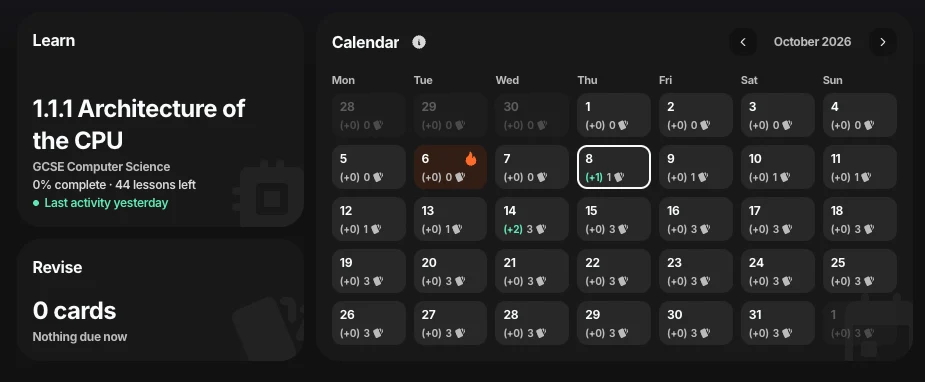
Figure 1. Home calendar showing current and upcoming due cards.
7. Staying on Top of Revision
Try to complete cards when they become due rather than allowing them to build up.
Regular revision in smaller amounts helps you revisit knowledge at useful intervals and makes it easier to maintain proficiency across a course.
The Decks page lets you create your own custom decks and use Live Decks, such as Due and At Risk, to quickly find cards that need your attention.
For more detail on how Knowness schedules cards for future review, see 4.2 Spaced Practice and Revision Scheduling. For more information on creating and using decks, see 4.3 Decks and Deck Manager.