

If you notice something in a lesson that appears incorrect or is not working as expected, you can report it directly from Knowness.
Reports are sent to the Knowness team for review so the issue can be investigated and, where necessary, corrected.
1. Reporting Lesson Content
You can report either a general lesson issue or an issue with a specific topic. At the end of the lesson, select Report a Mistake to open the reporting form.

Figure 1. Report a Mistake option within a lesson.
From the Topic selector, you can choose:
- General lesson issue: Use this when the problem relates to the lesson as a whole or does not belong to one specific topic.
- Specific topic: Select the topic that contains the issue so the Knowness team can identify exactly where the problem appears.
Describe what needs correcting, then select Send report.
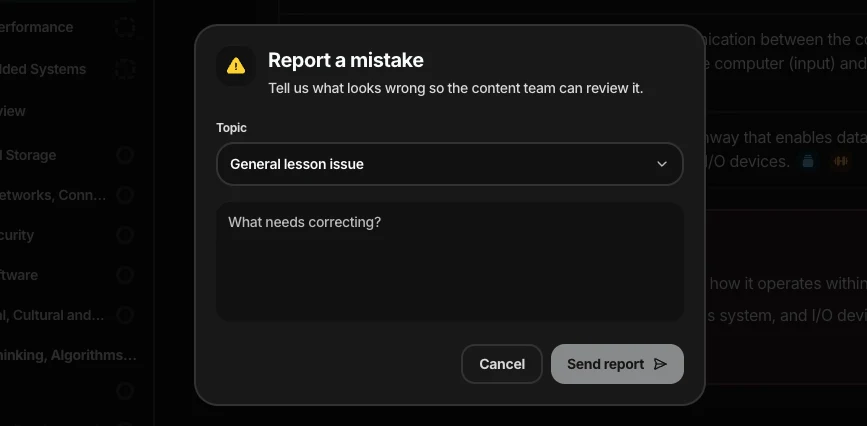
Figure 2. Report form for describing the issue.
You can also report a topic directly while viewing it. Select the Report a Mistake icon in the top-right corner of the topic, and the reporting form will automatically select that topic for you.
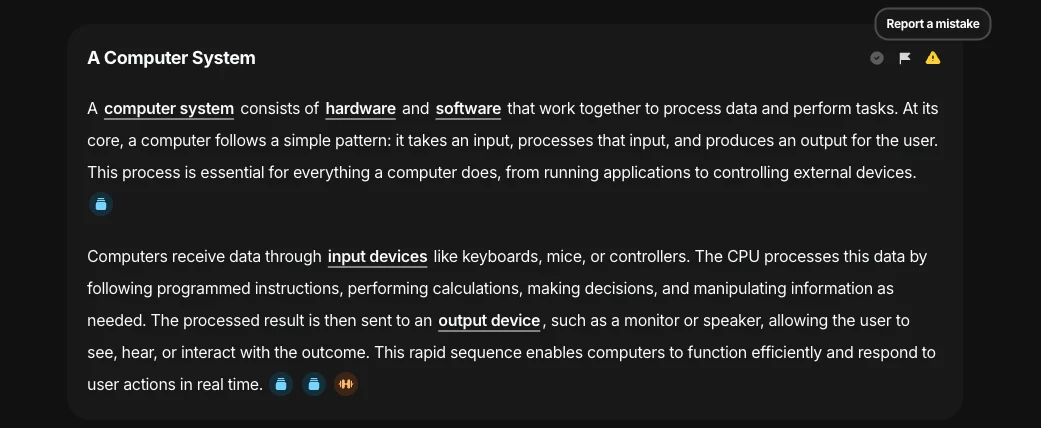
Figure 3. Report a Mistake option within a topic.
This helps ensure the report is linked to the exact part of the lesson you are referring to.
2. Reporting a Flashcard or Exercise
You can also report a mistake directly from a flashcard or exercise. After you answer a card, a Report a Mistake button appears for that specific card.
Use this when the issue relates to:
- The question: The wording or content appears incorrect.
- The answer: The expected or displayed answer appears incorrect.
- Answer checking: You believe your response was marked incorrectly.
- Feedback: The feedback shown does not appear correct or helpful.
- Another card-specific issue: Anything else that relates specifically to that flashcard or exercise.
Some flashcards and exercises use automated answer checking so that correctly worded answers do not always need to match the expected answer exactly.
If you believe your answer was assessed incorrectly, use the Report a Mistake button after answering the card.
Because the report is submitted directly from the card, Knowness can identify the exact flashcard or exercise, along with the relevant question and answer information.
3. What Happens Next
Once submitted, your report is reviewed by the Knowness team.
If an issue is confirmed, the relevant content or system behaviour can be updated. You may also receive an update once your report has been reviewed or resolved.
You can follow the progress of your reported mistakes in the Help Centre, where you can view their current status and any updates from the Knowness team.
For general feedback about how useful or clear a lesson was, use Content Feedback instead. See 3.9 Content Feedback for more information.