

GCSE
Computer Science
-
Introduction to GCSE Computer Science -
1.1 Systems Architecture -
1.2 Memory and Storage -
1.3 Computer Networks, Connections and Protocols -
1.4 Network Security -
1.5 Systems Software -
1.6 Ethical, Legal, Cultural and Environmental Impacts of Digital Technology -
2.1 Algorithms -
2.2 Programming Fundamentals -
2.3 Producing Robust Programs -
2.4 Boolean Logic -
2.5 Programming Languages and Integrated Development Environments
1. Computer Systems
1.3.5 Star and Mesh Network Topologies
In this lesson, we will explore star and mesh network topologies. We will learn how star networks use a central hub for communication, making them easy to manage but vulnerable to failure. We will also examine mesh networks, where devices connect directly to each other, offering reliability but at a higher cost and complexity. Network topologies define how devices are connected in a network. Two common topologies are Star and Mesh.
Star Topology
In a star topology, all devices are connected to a central hub or switch. All communication goes through the hub, which simplifies network management but may lead to a single point of failure. If the central hub fails, the entire network may become non-functional.
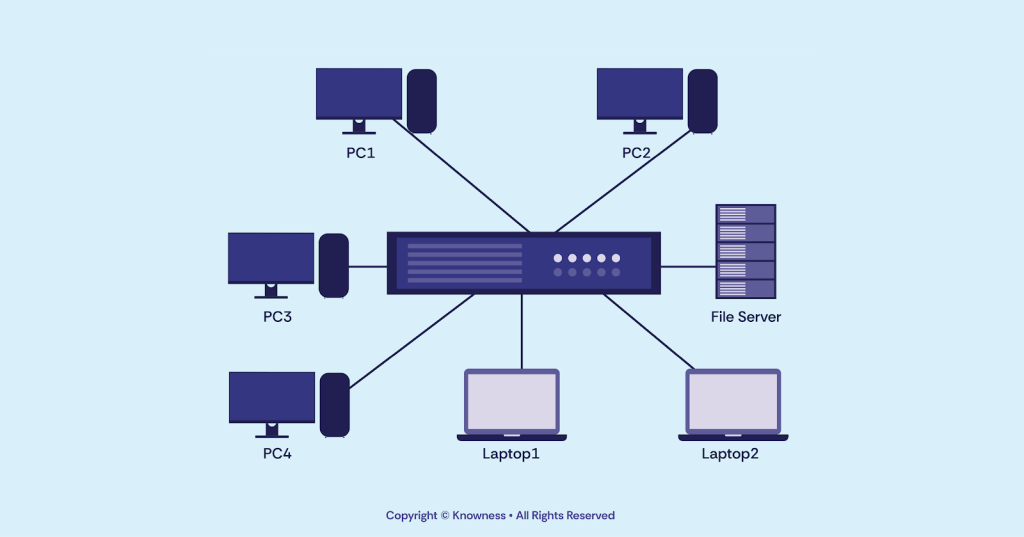
The star topology is commonly used in LANs due to its ease of installation and centralised control.
| Advantages | Disadvantages |
|---|---|
| Easy to Manage: The centralised nature of the star topology makes it easy to manage and troubleshoot network connections. | Dependency on Central Hub: The network's functionality depends heavily on the central hub. If it fails, the whole network is affected. |
| Isolation of Devices: Issues with one device do not affect other devices in the network. Each device has its connection to the central hub. | Single Point of Failure: The central hub is a single point of failure. If it malfunctions, the entire network becomes inaccessible. |
| Easy to Expand: Adding new devices to the network is straightforward, as they only need to connect to the central hub. | Cabling Complexity: The star topology requires a significant amount of cabling, especially when connecting a large number of devices to the central hub. |
Continue the lesson
This section is available to learners with course access. Continue learning with Knowness to unlock the full explanation, examples, revision tools, and progress tracking.
The remaining lesson content includes further guided explanation, important learning points, and supporting interactive material designed to help you understand and revise this topic.
Unlock this topic to view the full activity, worked examples, common mistakes, and additional revision support.
More content available
Knowness lessons are structured to build understanding step by step. Create an account or upgrade your access to continue from this point.
This preview does not include the hidden lesson text, answers, explanations, or embedded interactions.
Continue learning with Knowness
Sign up to access the full lesson, predicted grades, revision tools, progress tracking, and more.
Create a free accountStar Topology
- In a star topology, all devices are connected to a central hub or switch.
- All communication passes through the central hub, which simplifies management but introduces a single point of failure.
- Star topologies are commonly used in LANs because they are easy to install, manage, and expand.
- If one device fails, the rest of the network remains unaffected.
- If the central hub fails, the entire network goes down.
- Star networks require more cabling, especially in larger setups.
Mesh Topology
- In a mesh topology, every device is connected directly to every other device.
- This provides redundancy and multiple data paths, increasing fault tolerance.
- Mesh networks are highly reliable and scalable.
- They are used in systems where uptime is critical, such as military communications and data centres.
- Mesh topologies are expensive and complex to manage due to the number of connections.
- Fully meshed networks may have underused links, creating wasteful redundancy.