

GCSE
Computer Science
-
Introduction to GCSE Computer Science -
1.1 Systems Architecture -
1.2 Memory and Storage -
1.3 Computer Networks, Connections and Protocols -
1.4 Network Security -
1.5 Systems Software -
1.6 Ethical, Legal, Cultural and Environmental Impacts of Digital Technology -
2.1 Algorithms -
2.2 Programming Fundamentals -
2.3 Producing Robust Programs -
2.4 Boolean Logic -
2.5 Programming Languages and Integrated Development Environments
1. Computer Systems
In this lesson, we will explore how digital images are represented using pixels and binary codes. We will learn how colour depth and resolution affect image quality and file size. Additionally, we will examine metadata, which provides important details about an image, such as its dimensions, creation date, and technical properties.
Image Representation as Pixels
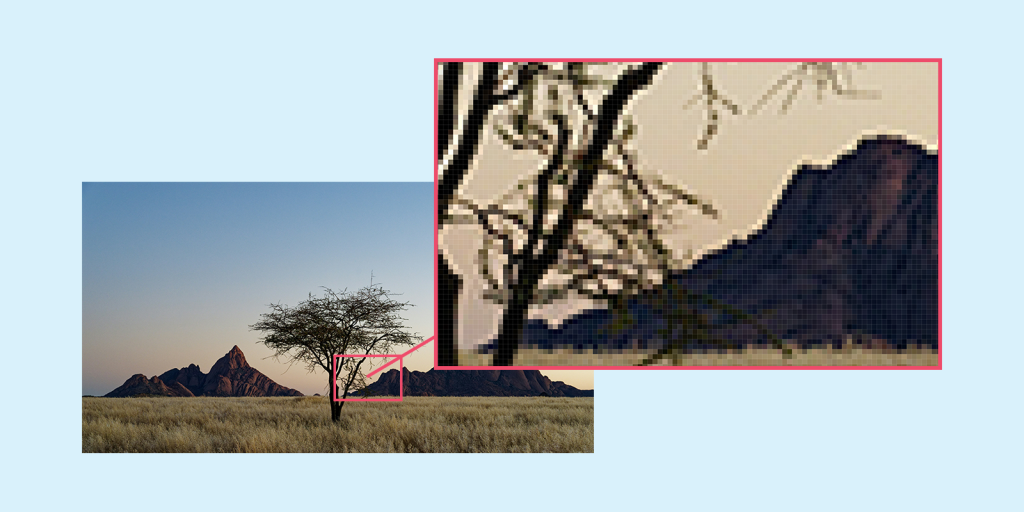
An image is a visual representation of an object, scene, or graphic, composed of a collection of pixels. Pixels are tiny coloured squares that together form the entire image. Each pixel has a specific colour, which is represented by a specific code in binary format.
Continue the lesson
This section is available to learners with course access. Continue learning with Knowness to unlock the full explanation, examples, revision tools, and progress tracking.
The remaining lesson content includes further guided explanation, important learning points, and supporting interactive material designed to help you understand and revise this topic.
Unlock this topic to view the full activity, worked examples, common mistakes, and additional revision support.
More content available
Knowness lessons are structured to build understanding step by step. Create an account or upgrade your access to continue from this point.
This preview does not include the hidden lesson text, answers, explanations, or embedded interactions.
Continue learning with Knowness
Sign up to access the full lesson, predicted grades, revision tools, progress tracking, and more.
Create a free accountImage Representation as Pixels
- An image is made up of pixels, each representing a specific colour.
- Each pixel’s colour is stored in binary using bits for red, green, and blue values.
- The number of bits used per pixel is called the colour depth.
- Higher colour depth allows more colours and produces more accurate and vibrant images.
Metadata in Images
- Metadata is data about the image, such as dimensions, date, camera settings, and author.
- It helps organise, identify, and protect image ownership.
Colour Depth and Resolution
- Colour depth determines how many colours each pixel can show (e.g., 24-bit colour can show over 16 million colours).
- Resolution is the number of pixels in the image (width × height).
- Higher resolution = more detail, but also larger file sizes.
- Increasing either resolution or colour depth increases file size.
Vector Images and How They Compare to Bitmaps
- Vector images use mathematical equations to represent shapes and lines.
- Vectors can be resized without losing quality (resolution-independent).
- Bitmap images are made of pixels and can lose quality when scaled.
- Vectors are ideal for logos and icons; bitmaps are better for photos.