


2.1.2 Designing, Creating and Refining Algorithms
In this lesson, you will learn how algorithms are designed, represented, tested, and refined. You will identify the inputs, processes, and outputs of an algorithm, represent algorithms using pseudocode, flowcharts, and Python, and learn how trace tables can be used to test algorithms and identify common errors.
Algorithms
As introduced in Lesson 2.1.1 Computational Thinking, an algorithm is a step-by-step sequence of instructions used to solve a problem or complete a task.
For an algorithm to work correctly, each instruction must be clear and precise so that it can be understood without ambiguity. The algorithm must also show the correct order in which instructions should be carried out, where decisions need to be made, and whether any steps need to be repeated.
Algorithms can be designed before programming begins, allowing programmers to focus on solving the problem without worrying about the syntax (rules) of a particular programming language.
Identifying Inputs, Processes, and Outputs for a Problem
Every algorithm can be thought of as having three main parts:
- Inputs: The data that is provided to the algorithm.
- Processes: The steps the algorithm performs using the input data.
- Outputs: The results produced by the algorithm.
This relationship is often called the Input-Process-Output (IPO) model.
An input can come from many sources; for example, it could be typed using a keyboard, spoken into a microphone, read from a file, or collected by a sensor. The process is the sequence of instructions that manipulates the input data to solve the problem. Finally, the output is the information produced by the algorithm. This might be displayed on a screen, printed on paper, written to a file, or sent to another device.
Structure Diagrams
A structure diagram is a form of top-down design that helps break a complex problem into smaller, more manageable parts; in other words, to decompose it.
The overall problem is placed at the top of the diagram. It is then divided into smaller tasks underneath it. These tasks can be broken down further until each part is simple enough to understand and work on separately.
For example, a Sat Nav system can be divided into two main tasks: receiving the user’s destination and providing directions. These can then be broken down further. The destination could be a new destination or a saved destination, while the directions could be displayed using a map or a list.
A structure diagram can contain as many levels as necessary. If one of the lower-level tasks is still too complex, it can be decomposed again until each part is clearly defined.
Creating, Interpreting, Correcting, Completing, and Refining Algorithms
Algorithms can be represented in different ways to help programmers create, interpret, correct, complete, and refine solutions to problems. Each representation describes the same algorithm but presents it in a different format.
The three most common representations are pseudocode, flowcharts, and high-level programming languages. Pseudocode describes the logical steps of an algorithm using structured English, flowcharts show the sequence of steps using standard symbols, and high-level programming languages, such as Python, provide instructions that a computer can execute.
Using Pseudocode
Pseudocode is a high-level, human-readable representation of an algorithm. It uses a mixture of natural language and programming-style keywords to describe the steps needed to solve a problem without following the strict syntax rules of a specific programming language.
Because pseudocode focuses on the logic of a solution rather than the rules of a programming language, it is often used to plan algorithms before writing the final program. It is also easier to read, discuss, and modify than program code.
Let’s use pseudocode to design an algorithm that applies a 10% discount when the price of an item is £50 or more. Before writing the algorithm, it is helpful to identify its inputs, processes, and outputs as shown below in Table 1.
| Inputs | Processes | Outputs |
|---|---|---|
| The price of the item. | Check whether the price is £50 or more. | The final price of the item. |
| If it is, calculate the final price by multiplying the original price by 0.9. | ||
| Otherwise, keep the original price as the final price. |
Once these have been identified, the algorithm can be written in pseudocode.
INPUT Price

IF Price >= 50 THEN
    FinalPrice = Price * 0.9
ELSE
    FinalPrice = Price
END IF

OUTPUT FinalPrice
Code 1. Pseudocode that applies a 10% discount when the price of an item is £50 or more and outputs the final price.
The algorithm starts by receiving the price of the item. It then checks whether the price is £50 or more. If it is, the price is multiplied by 0.9 to apply a 10% discount. Otherwise, the original price is kept. The final price is then output.
Using Flowcharts
A flowchart is a graphical representation of an algorithm. Instead of using words alone, it uses standard symbols connected by arrows to show the order in which instructions are carried out.
Flowcharts make algorithms easier to understand because they provide a clear visual representation of the program’s logic.
| Name | Symbol | Usage |
|---|---|---|
| Line |  | Shows the direction the algorithm follows. |
| Process | 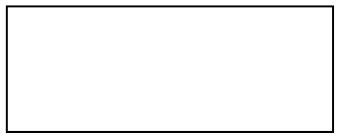 | Performs an action, such as a calculation or assigning a value to a variable. |
| Sub Program | 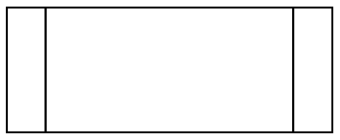 | Calls a separate section of the algorithm. |
| Input / Output |  | Receives input or displays output. |
| Decision |  | Asks a question that has two possible outcomes (for example, Yes/No or True/False). |
| Terminal | 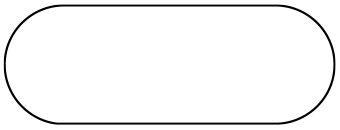 | Used only at the beginning and end of the flowchart. |
When creating or interpreting a flowchart, the following rules should always be followed:
- Every flowchart begins with a Start terminal.
- Every flowchart ends with an End terminal.
- Arrows show the order in which instructions are carried out and indicate the direction of control through the algorithm.
- A decision has two labelled arrows leaving it, representing its two possible outcomes, such as Yes/No or True/False.
The flowchart below in Figure 3 represents the same discount algorithm as the pseudocode in Code 1. It begins and ends with terminal symbols, uses input/output symbols to receive and display data, process symbols to assign or calculate the final price, and a decision symbol to determine whether the discount should be applied.
Notice that the decision has two labelled outputs, Yes and No. If the answer is Yes (i.e. the condition is True), the algorithm calculates a discounted price. If the answer is No (i.e. the condition is False), the original price is kept. The two paths then rejoin before the final price is output.
The Sub Program symbol from Table 2 is not needed in this flowchart because the algorithm does not call a subprogram. Flowcharts only use the symbols that are required to represent the algorithm.
Using Reference Language/High-Level Programming Language
Once an algorithm has been designed and tested, it can be represented using a reference language or implemented using a high-level programming language.
A reference language is a standardised notation for writing algorithms that is independent of any particular programming language. In OCR GCSE Computer Science, exam questions use the OCR Exam Reference Language (ERL). A high-level programming language, such as Python, Java, or C++, uses precise syntax that allows the computer to execute the algorithm.
Unlike pseudocode, programming languages have strict rules (syntax) that must be followed exactly before the computer can execute the program. If these rules are broken, the program will produce a syntax error and may not run.
Programmers often write algorithms in pseudocode first because it is easier to modify and discuss before writing the final program.
Python is used throughout this course as the example high-level programming language. Below in Code 2 is the Python implementation of the discount algorithm shown in the previous pseudocode and flowchart examples.
price = float(input("Enter the price: "))

if price >= 50:
    final_price = price * 0.9
else:
    final_price = price

print(final_price)
Code 2. Python code that applies a 10% discount when the price of an item is £50 or more and outputs the final price.
Although this program performs the same task as the pseudocode and flowchart, it must follow Python’s syntax rules. For example, the if and else statements end with a colon (:), indentation is used to show which statements belong to each branch, and keywords must be written exactly as Python expects.
Identifying Common Errors
After an algorithm has been designed and implemented, it should be tested to check that it works correctly. During testing, programmers often encounter syntax errors and logic errors.
Syntax Errors
A syntax error occurs when the rules (syntax) of a programming language have not been followed. Because the computer cannot understand the incorrect code, the program will usually not run until the error has been corrected.
For example, the Python code below in Code 3 contains a syntax error because the colon (:) is missing after the if statement.
if price >= 50
    final_price = price * 0.9
Code 3. Python code containing a syntax error caused by a missing colon after the if statement.
The corrected code is shown below in Code 4.
if price >= 50:
    final_price = price * 0.9
Code 4. The corrected version of the code, with the missing colon added.
Common causes of syntax errors include:
- Missing or incorrect punctuation (such as brackets, quotation marks or colons).
- Misspelt keywords or function names.
- Incorrect indentation (in Python).
- Missing operators or symbols.
Logic Errors
A logic error occurs when a program follows the correct syntax and runs successfully, but does not behave as intended or produces an incorrect result. Logic errors are often more difficult to identify than syntax errors because no error message is produced.
For example, the discount algorithm should reduce the original price by 10%. The code below incorrectly multiplies the price by 0.1 instead of 0.9, so the program runs successfully but calculates the wrong final price.
final_price = price * 0.1Code 5. Python code containing a logic error because the final price is calculated incorrectly.
The corrected code is shown below in Code 6.
final_price = price * 0.9Code 6. The corrected version of the code, which reduces the original price by 10%.
Common causes of logic errors include:
- Using the wrong comparison operator.
- Performing calculations incorrectly.
- Updating the wrong variable.
- Repeating a loop too many or too few times.
- Carrying out steps in the wrong order.
Trace Tables
Once an algorithm has been written, it should be tested to check that it produces the expected results. One of the most useful ways of doing this is by using a trace table.
A trace table records how the values of variables change as an algorithm is followed step by step. By following the algorithm manually, programmers can check that variables are updated correctly, calculations are performed as expected, and the final output is correct. Trace tables are particularly useful for identifying logic errors, as they show exactly where an algorithm begins to produce incorrect values.
Let’s use a trace table to test the discount algorithm from Code 1. Suppose the user enters a price of £60. The algorithm can be followed line by line, with the values of its variables recorded after each relevant line has been executed.
| Line | Price | FinalPrice | Output | Comments |
|---|---|---|---|---|
| 1: | 60 | - | - | User enters a price of £60. |
| 3: | 60 | - | - | 60 is greater than or equal to 50, so the condition is True. |
| 4: | 60 | 54 | - | A 10% discount is applied. |
| 9: | 60 | 54 | 54 | The final price of £54 is output. |
The trace table shows that the input price is £60. At line 3, the condition is true, so the algorithm follows the first branch and calculates as . The ELSE branch is therefore skipped, and the final price of £54 is output at line 9.
A trace table can be completed using different input values to test different paths through an algorithm. For example, using a price below £50 would test the ELSE branch of the discount algorithm.